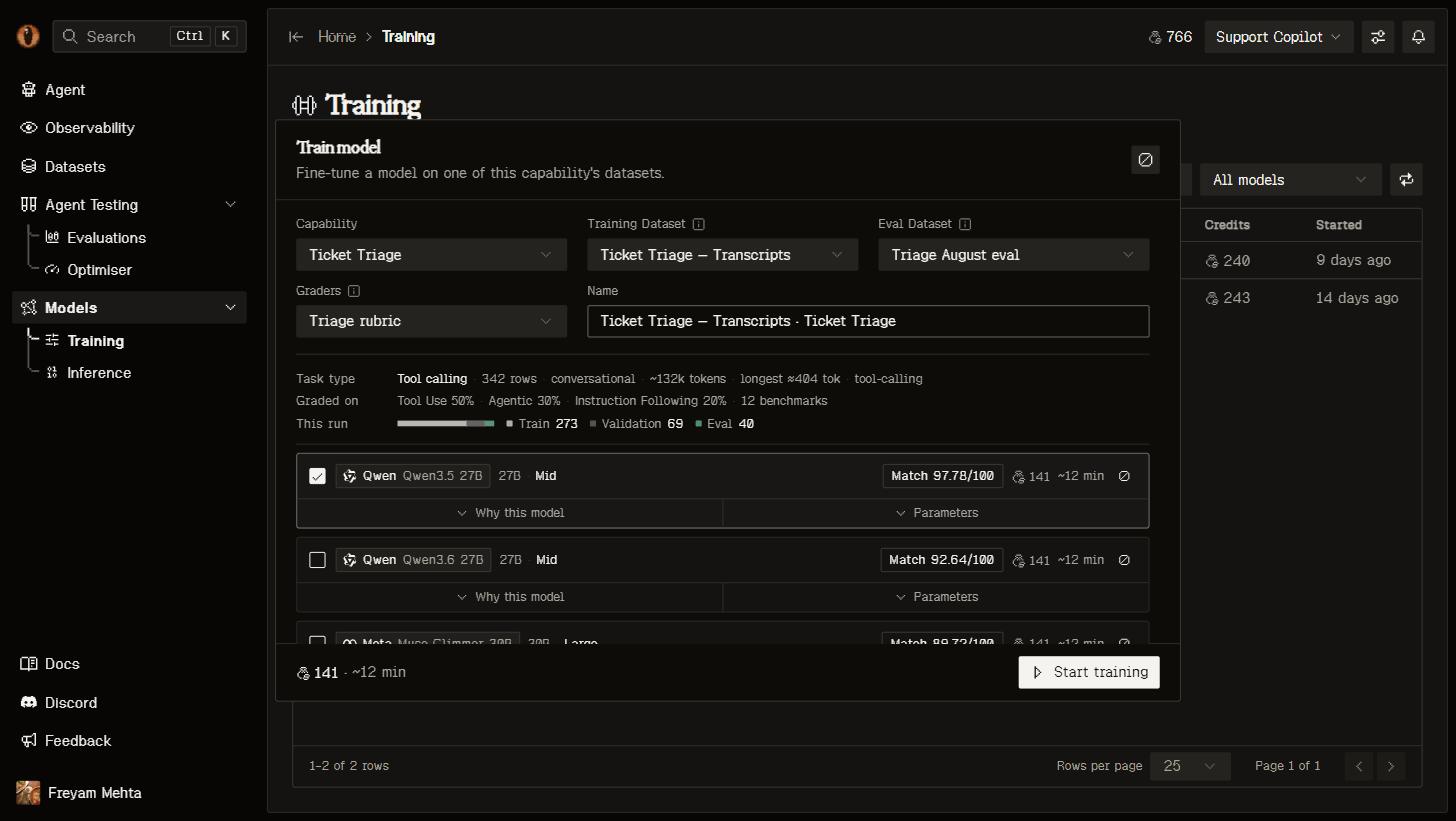
 Over MCP, `start_finetune` derives model-specific defaults when `hyperparameters` is omitted. To set the method yourself, pass `"training_type": {"type": "Lora"}` or `{"type": "Full"}`; a plain string is refused before the job is created, with a field-level error.
## Exact preprocessing
Workshop quality reviews remain advisory and are not repeated as launch approval gates. Training performs model-specific preparation, not repairs to labels, evidence or task scope.
For Modal, CPU preprocessing runs after launch and before GPU training using the matching tokenizer, chat template and loss mask. Setup does not start or wait for preprocessing. Recommendations size context from estimated row lengths; job preparation includes pinned training and enabled validation data. Exact overflow within the model's training-method limit requests a larger context and rechecks every row. Over-limit rows, invalid tool formatting and examples without supervised next-token targets still block. Nothing is silently truncated or discarded.
The GPU consumes the matching validated token artifact and saved tokenizer. Repair incompatible data in the workshop and prepare the revised version. Explicit REST `POST /api/training-preparations/` and MCP `prepare_training_data` run the same preparation; poll with `get_job(kind="training_preparation")`.
Worker failures are distinct from incompatible data. A processor/code mismatch requires deploying the current Modal SFT worker, not just restarting Docker. Preprocessing logs remain at `preparations/
Over MCP, `start_finetune` derives model-specific defaults when `hyperparameters` is omitted. To set the method yourself, pass `"training_type": {"type": "Lora"}` or `{"type": "Full"}`; a plain string is refused before the job is created, with a field-level error.
## Exact preprocessing
Workshop quality reviews remain advisory and are not repeated as launch approval gates. Training performs model-specific preparation, not repairs to labels, evidence or task scope.
For Modal, CPU preprocessing runs after launch and before GPU training using the matching tokenizer, chat template and loss mask. Setup does not start or wait for preprocessing. Recommendations size context from estimated row lengths; job preparation includes pinned training and enabled validation data. Exact overflow within the model's training-method limit requests a larger context and rechecks every row. Over-limit rows, invalid tool formatting and examples without supervised next-token targets still block. Nothing is silently truncated or discarded.
The GPU consumes the matching validated token artifact and saved tokenizer. Repair incompatible data in the workshop and prepare the revised version. Explicit REST `POST /api/training-preparations/` and MCP `prepare_training_data` run the same preparation; poll with `get_job(kind="training_preparation")`.
Worker failures are distinct from incompatible data. A processor/code mismatch requires deploying the current Modal SFT worker, not just restarting Docker. Preprocessing logs remain at `preparations/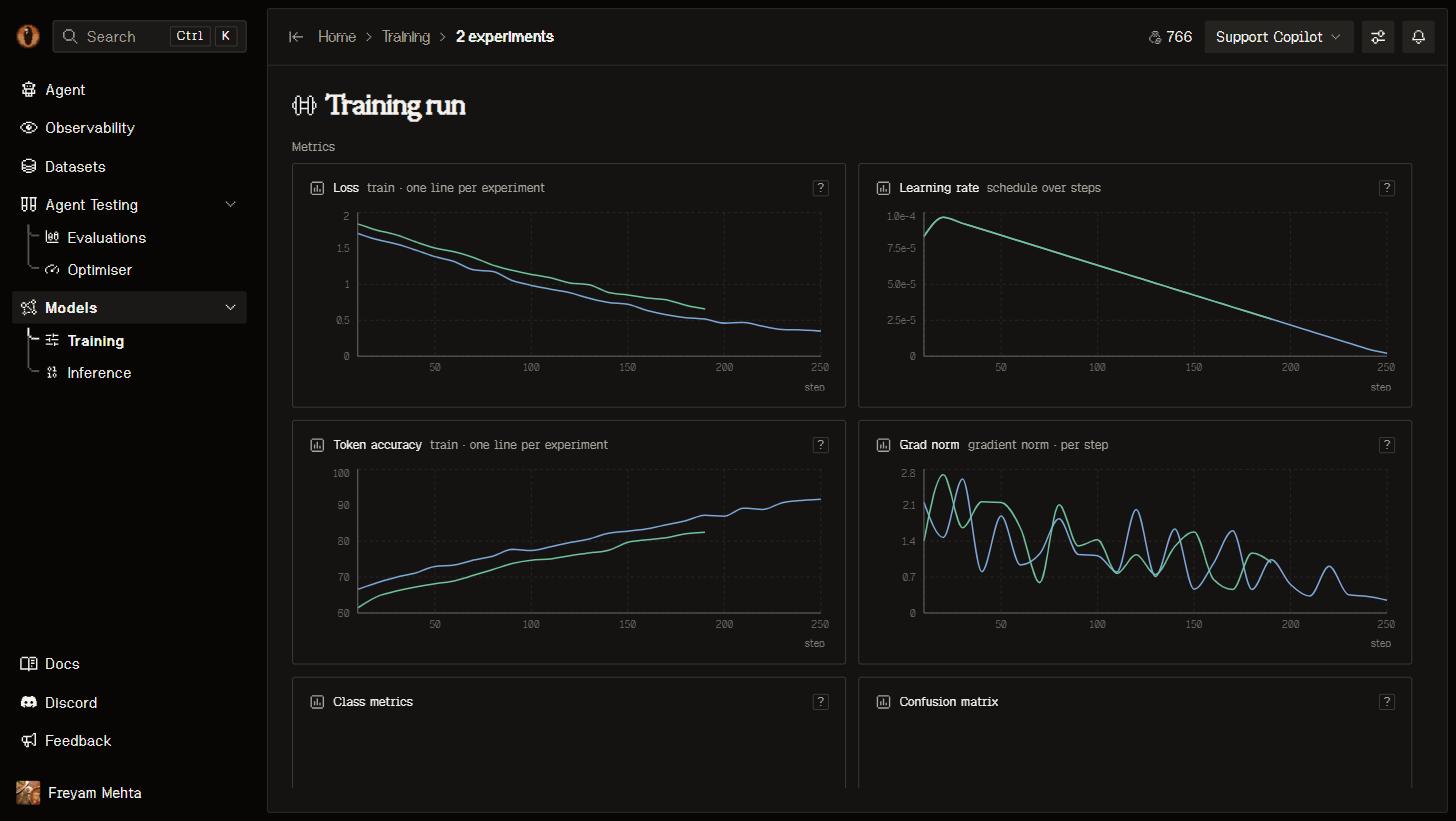 A job moves from queued, through training, to deploying, and lands on succeeded. While it runs you get per-step train and validation loss, learning rate, token accuracy and gradient norm, alongside steps completed, an ETA, tokens processed and credits used. You can cancel a run at any point, and retry one that failed.
Before GPU submission, Retry also recovers confirmed preprocessing failures or an undersized context through a matching new preparation. Ready/in-flight artifacts are retained. Unresolved data incompatibilities and uncertain submissions refuse retry without resetting evaluations.
## The benchmark
Choose **Benchmark model** in setup: the codebase incumbent or a ready trained model in this project. This selection is saved for the run and is independent of **Live** serving. REST/MCP accept `baseline_model`; omission uses the capability's separate `benchmark_model` default or codebase incumbent. MCP `set_benchmark_model` changes that default.
Four independent checkboxes choose what to evaluate:
| Model | Before training | After training |
| - | - | - |
| Benchmark model | The selected benchmark | The same saved benchmark |
| Training model | The untouched base | The trained checkpoint once serving is ready |
Untouched-base-before and trained-model-after are the defaults. Incumbent comparisons are opt-in; all four can be off, but eval data and graders remain required. REST/MCP expose `eval_incumbent_before`, `eval_incumbent_after`, `eval_model_before` and `eval_model_after`.
Every selected evaluation uses the entire pinned eval version, the same prompt snapshot and frozen graders. Before evaluations run alongside training without gating it; after evaluations wait for training, and checkpoint evaluations wait for deployment. Intermediate checkpoints are not automatically judged. Recorded inputs and tools are replayed, not the live application; a capability prompt is injected only where a row lacks a system turn.
**Judge model**, below **Eval set**, defaults to the set's per-evaluator choices. An explicit selection is saved for this run and used on both sides of the comparison without changing the set. REST/MCP use `eval_judge_model`; it cannot change after launch. The dropdown labels estimated context fit and judge-budget differences. Estimated limit overflows turn affected selectors and **Start** orange; undersized options are greyed out but remain selectable. Clicking **Start** opens a short risk summary with **Start anyway**, without requiring a model change. Unverified, unavailable and pending checks stay neutral and do not open this warning. Shared incumbent evaluations require the same judge selection as well as matching data and benchmark context.
Supported untouched bases use OpenRouter when exactly matched in its catalog; otherwise they use a Modal deployment. Once an eval or baseline deployment starts, its route stays pinned until an explicit retry. Trained checkpoints use their own deployment.
The Evals table shows selected evaluations immediately, including what each is waiting for, and keeps updating after deployment. Evaluations that never start are skipped if training fails or is cancelled. When experiments share an incumbent-before evaluation, the group view shows that run once as **Shared · N experiments**. Each experiment still has its own base-model and trained-model evaluations, and its individual view retains the shared incumbent result and comparison.
The headline delta compares against base-model-before when selected, otherwise incumbent-before, otherwise incumbent-after. With no comparison, it is absent. Token-limited outputs remain inspectable but are marked incomplete and not quality-scored. Training evaluations with degraded evidence report failure without a headline score or delta; a high average over a few complete rows is not a successful run.
A job moves from queued, through training, to deploying, and lands on succeeded. While it runs you get per-step train and validation loss, learning rate, token accuracy and gradient norm, alongside steps completed, an ETA, tokens processed and credits used. You can cancel a run at any point, and retry one that failed.
Before GPU submission, Retry also recovers confirmed preprocessing failures or an undersized context through a matching new preparation. Ready/in-flight artifacts are retained. Unresolved data incompatibilities and uncertain submissions refuse retry without resetting evaluations.
## The benchmark
Choose **Benchmark model** in setup: the codebase incumbent or a ready trained model in this project. This selection is saved for the run and is independent of **Live** serving. REST/MCP accept `baseline_model`; omission uses the capability's separate `benchmark_model` default or codebase incumbent. MCP `set_benchmark_model` changes that default.
Four independent checkboxes choose what to evaluate:
| Model | Before training | After training |
| - | - | - |
| Benchmark model | The selected benchmark | The same saved benchmark |
| Training model | The untouched base | The trained checkpoint once serving is ready |
Untouched-base-before and trained-model-after are the defaults. Incumbent comparisons are opt-in; all four can be off, but eval data and graders remain required. REST/MCP expose `eval_incumbent_before`, `eval_incumbent_after`, `eval_model_before` and `eval_model_after`.
Every selected evaluation uses the entire pinned eval version, the same prompt snapshot and frozen graders. Before evaluations run alongside training without gating it; after evaluations wait for training, and checkpoint evaluations wait for deployment. Intermediate checkpoints are not automatically judged. Recorded inputs and tools are replayed, not the live application; a capability prompt is injected only where a row lacks a system turn.
**Judge model**, below **Eval set**, defaults to the set's per-evaluator choices. An explicit selection is saved for this run and used on both sides of the comparison without changing the set. REST/MCP use `eval_judge_model`; it cannot change after launch. The dropdown labels estimated context fit and judge-budget differences. Estimated limit overflows turn affected selectors and **Start** orange; undersized options are greyed out but remain selectable. Clicking **Start** opens a short risk summary with **Start anyway**, without requiring a model change. Unverified, unavailable and pending checks stay neutral and do not open this warning. Shared incumbent evaluations require the same judge selection as well as matching data and benchmark context.
Supported untouched bases use OpenRouter when exactly matched in its catalog; otherwise they use a Modal deployment. Once an eval or baseline deployment starts, its route stays pinned until an explicit retry. Trained checkpoints use their own deployment.
The Evals table shows selected evaluations immediately, including what each is waiting for, and keeps updating after deployment. Evaluations that never start are skipped if training fails or is cancelled. When experiments share an incumbent-before evaluation, the group view shows that run once as **Shared · N experiments**. Each experiment still has its own base-model and trained-model evaluations, and its individual view retains the shared incumbent result and comparison.
The headline delta compares against base-model-before when selected, otherwise incumbent-before, otherwise incumbent-after. With no comparison, it is absent. Token-limited outputs remain inspectable but are marked incomplete and not quality-scored. Training evaluations with degraded evidence report failure without a headline score or delta; a high average over a few complete rows is not a successful run.
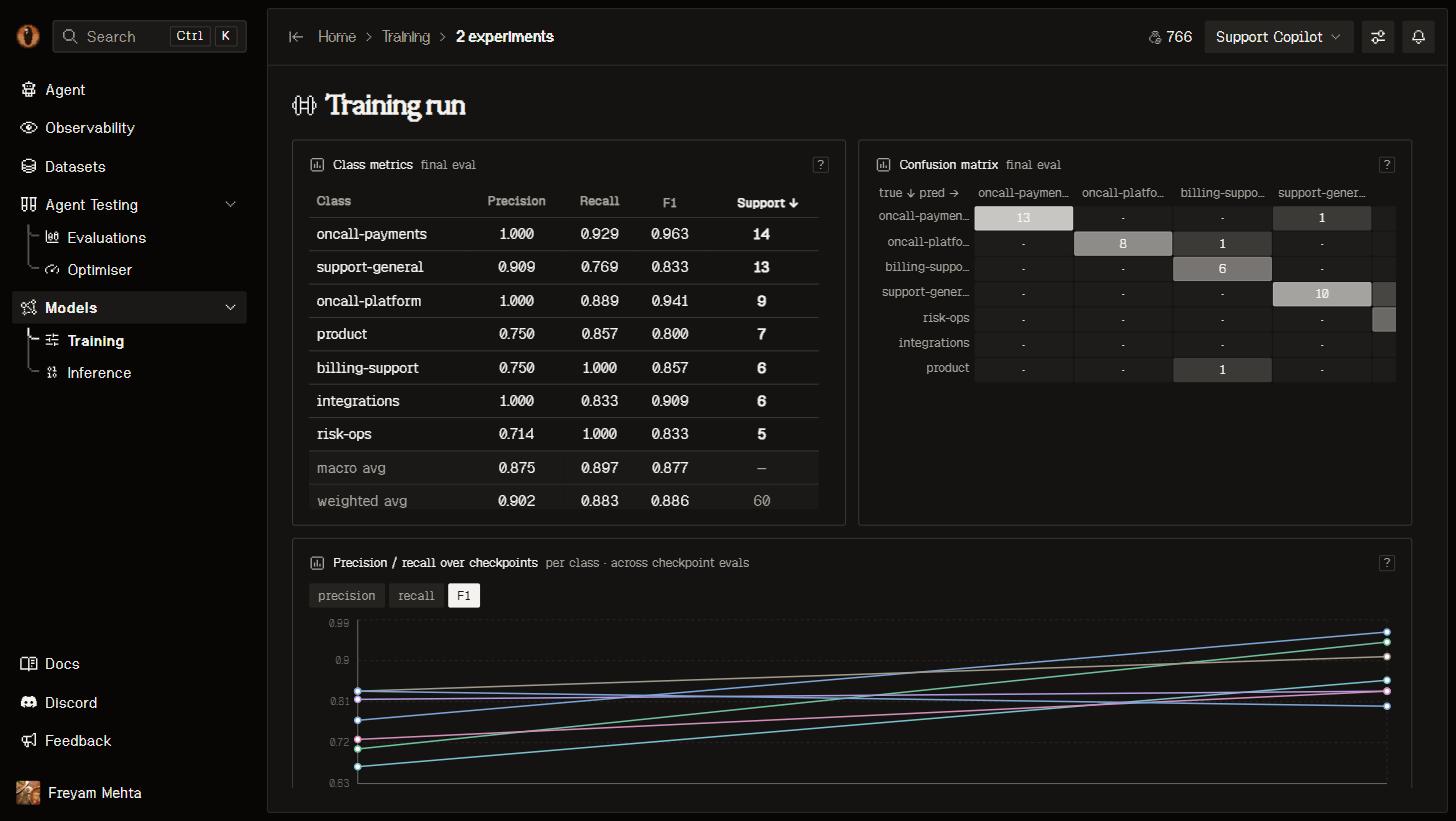
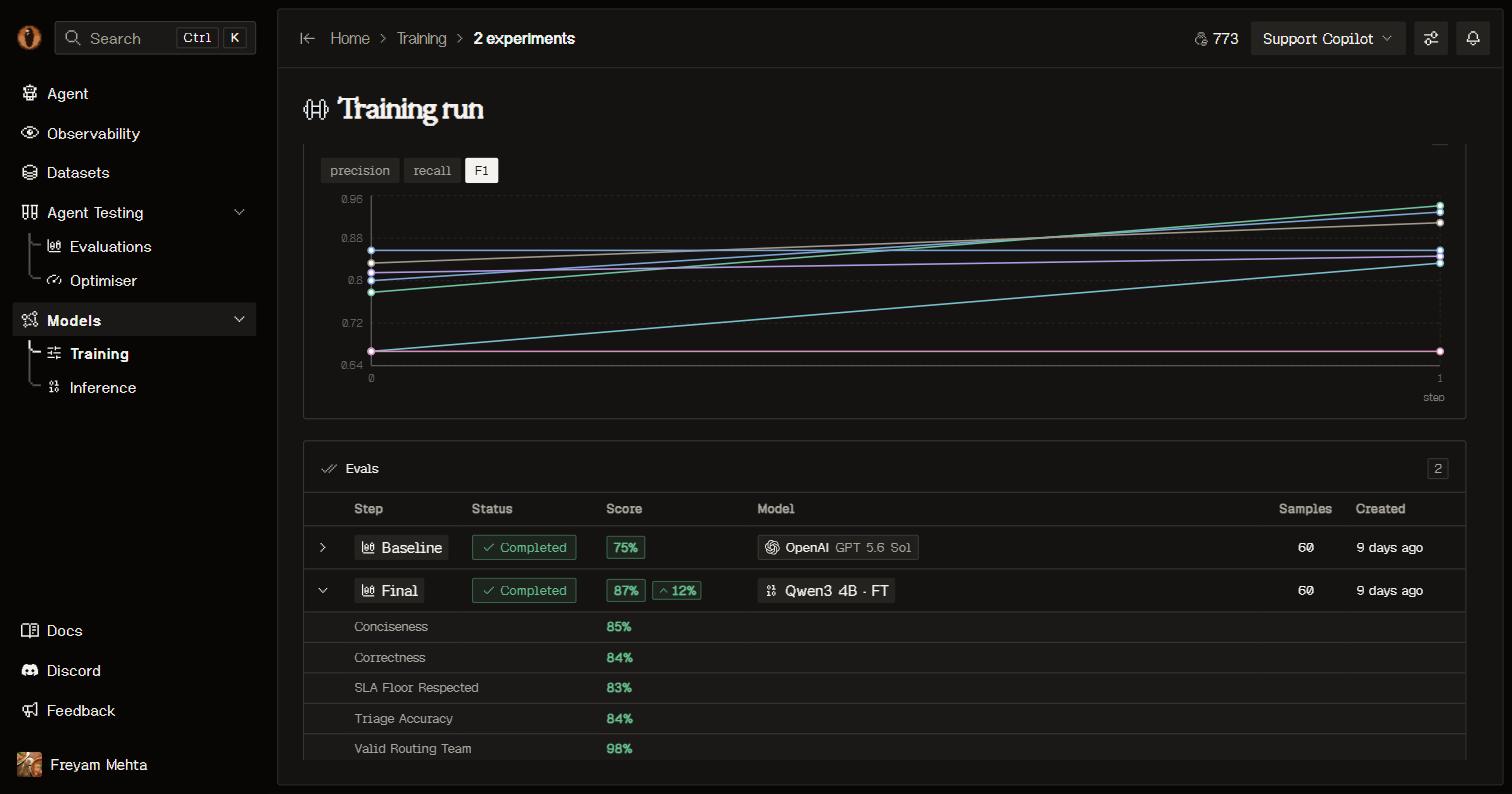 When your expected outputs are labels, you also get per-class precision, recall and F1, accuracy, and a confusion matrix — so a classifier tells you which class it's getting wrong, not just that it improved.
 ## Ship it
A finished job deploys its model for you. It appears on [Inference](/models/inference) and in your capability's **Models** tab with a reference like `ft-9635f347-qwen3-4b`, and its weights are downloadable from the model page or with `overmind model download-checkpoint`.
Two ways to put it in front of traffic:
* **Make live** wakes and verifies the model, then switches your capability’s alias `overmind/
## Ship it
A finished job deploys its model for you. It appears on [Inference](/models/inference) and in your capability's **Models** tab with a reference like `ft-9635f347-qwen3-4b`, and its weights are downloadable from the model page or with `overmind model download-checkpoint`.
Two ways to put it in front of traffic:
* **Make live** wakes and verifies the model, then switches your capability’s alias `overmind/