
What you need
Independent train and eval data gives meaningful held-out scores. Overmind reports overlap by normalized inputs, trace/conversation, groups and synthetic lineage as a warning; it does not drop selected rows or block launch. Successful creation atomically pins training, validation and eval versions. Internal loss-validation splitting keeps content/group families together and preserves duplicates. Deduplication belongs in the workshop.
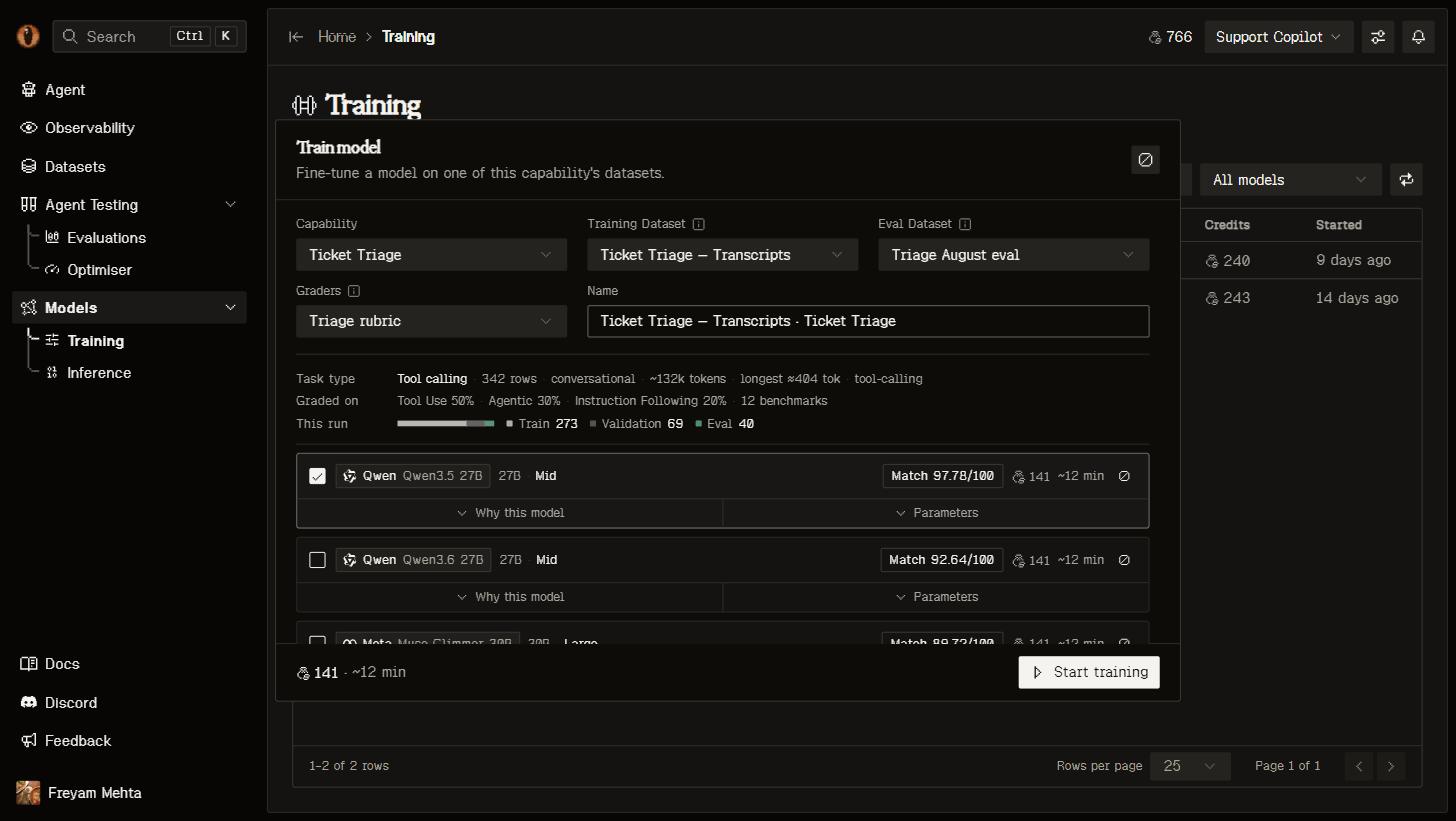
The training wizard: your data and graders on the left, the recommended models with cost and time estimates on the right.
start_finetune derives model-specific defaults when hyperparameters is omitted. To set the method yourself, pass "training_type": {"type": "Lora"} or {"type": "Full"}; a plain string is refused before the job is created, with a field-level error.
Exact preprocessing
Workshop quality reviews remain advisory and are not repeated as launch approval gates. Training performs model-specific preparation, not repairs to labels, evidence or task scope. For Modal, CPU preprocessing runs after launch and before GPU training using the matching tokenizer, chat template and loss mask. Setup does not start or wait for preprocessing. Recommendations size context from estimated row lengths; job preparation includes pinned training and enabled validation data. Exact overflow within the model’s training-method limit requests a larger context and rechecks every row. Over-limit rows, invalid tool formatting and examples without supervised next-token targets still block. Nothing is silently truncated or discarded. The GPU consumes the matching validated token artifact and saved tokenizer. Repair incompatible data in the workshop and prepare the revised version. Explicit RESTPOST /api/training-preparations/ and MCP prepare_training_data run the same preparation; poll with get_job(kind="training_preparation").
Worker failures are distinct from incompatible data. A processor/code mismatch requires deploying the current Modal SFT worker, not just restarting Docker. Preprocessing logs remain at preparations/<id>/preprocess_stdout.log on the SFT volume. Confirmed failures can retry; uncertain submissions fail closed.
Pick a model
The wizard ranks the catalogue and estimates cost and duration before launch. With a capability selected, its recorded codebase task determines the ranking; without one, the dataset’s task is used. An unclassifiable selected capability stays ungraded instead of borrowing the dataset’s task. Dataset measurements still drive context, tool compatibility and hyperparameters. Serving context is planned separately from training sequence length, using the pinned eval inputs, reference outputs and capability prompt. Cards show serving and output budgets. Estimated context overflow produces a warning without excluding the model or blocking launch. Unsupported GPU configurations still require correction. Training setup also estimates the incumbent and generative judges against the selected evaluation data. Runtime serving checks the actual templated input plus reserved output; these planning estimates are not exact tokenization and cannot guarantee provider acceptance. Increasing serving context does not require retraining. The wizard shows the constraints for each model:- Context. Training limits can be shorter than inference windows and differ between LoRA and full training. Estimates size context but do not exclude candidates; exact preparation determines compatibility.
- Tool calling. If your data contains tool calls, only models that support them are offered.
- Adapters. Larger dense models and every mixture-of-experts model train as LoRA adapters; the picker says so instead of offering a choice.
Launch
One run can launch several experiments at once, so you can try two learning rates or two base models side by side and compare them on the same page. Each experiment has its own Epochs, Learning rate and Batch, plus Rank, Alpha and Dropout when it’s training a LoRA adapter. The panel tells you what your data looks like — rows, tokens, longest row, whether it contains tool calls — so the numbers aren’t guesswork. Your coding agent can do the whole thing:/overmind finetune checks you’re ready, estimates the cost, launches the run, and follows it to the end.
Watch it train
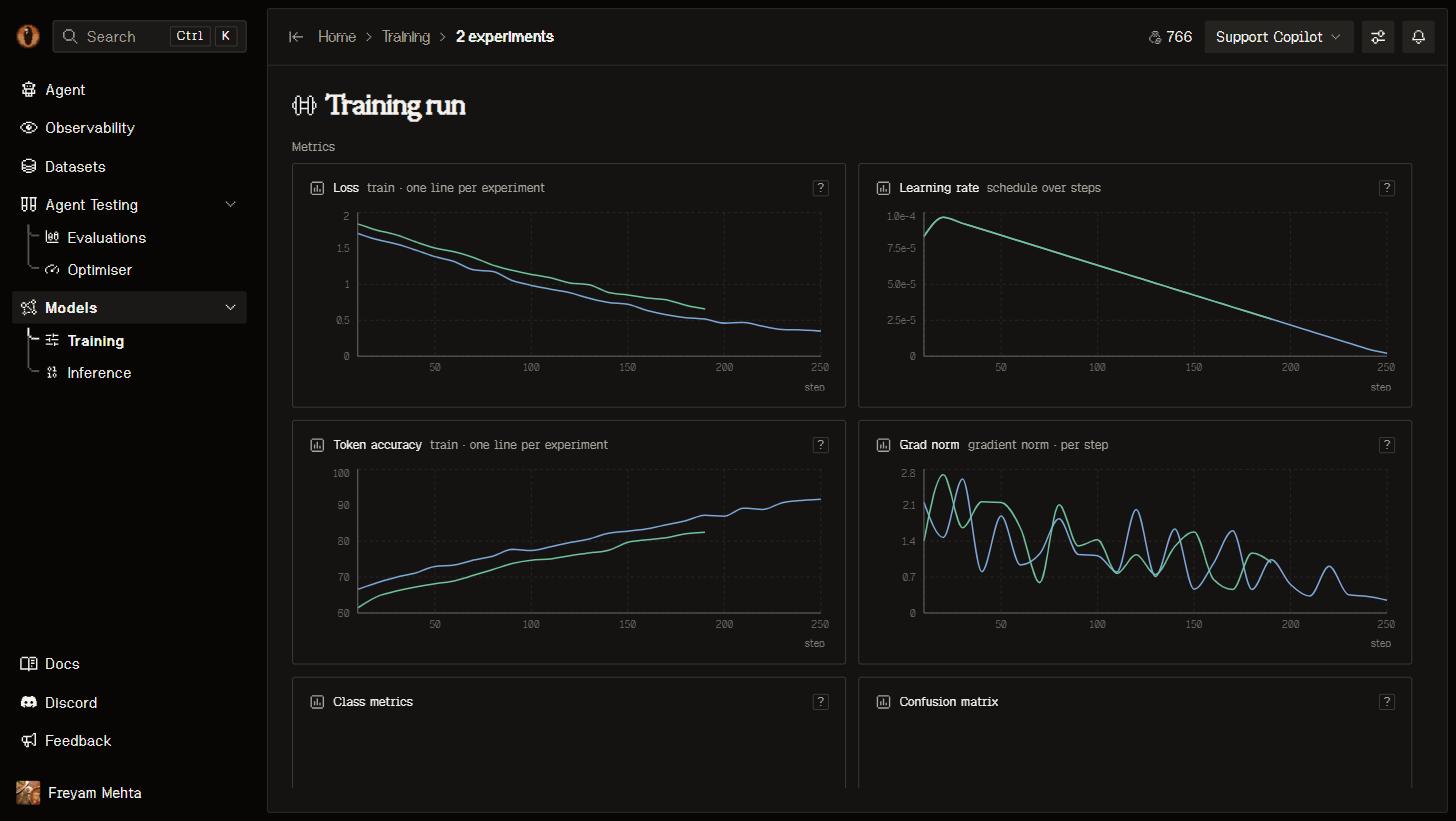
A finished experiment: train and validation loss per step, the learning-rate schedule, token accuracy and gradient norm.
The benchmark
Choose Benchmark model in setup: the codebase incumbent or a ready trained model in this project. This selection is saved for the run and is independent of Live serving. REST/MCP acceptbaseline_model; omission uses the capability’s separate benchmark_model default or codebase incumbent. MCP set_benchmark_model changes that default.
Four independent checkboxes choose what to evaluate:
Untouched-base-before and trained-model-after are the defaults. Incumbent comparisons are opt-in; all four can be off, but eval data and graders remain required. REST/MCP expose
eval_incumbent_before, eval_incumbent_after, eval_model_before and eval_model_after.
Every selected evaluation uses the entire pinned eval version, the same prompt snapshot and frozen graders. Before evaluations run alongside training without gating it; after evaluations wait for training, and checkpoint evaluations wait for deployment. Intermediate checkpoints are not automatically judged. Recorded inputs and tools are replayed, not the live application; a capability prompt is injected only where a row lacks a system turn.
Judge model, below Eval set, defaults to the set’s per-evaluator choices. An explicit selection is saved for this run and used on both sides of the comparison without changing the set. REST/MCP use eval_judge_model; it cannot change after launch. The dropdown labels estimated context fit and judge-budget differences. Estimated limit overflows turn affected selectors and Start orange; undersized options are greyed out but remain selectable. Clicking Start opens a short risk summary with Start anyway, without requiring a model change. Unverified, unavailable and pending checks stay neutral and do not open this warning. Shared incumbent evaluations require the same judge selection as well as matching data and benchmark context.
Supported untouched bases use OpenRouter when exactly matched in its catalog; otherwise they use a Modal deployment. Once an eval or baseline deployment starts, its route stays pinned until an explicit retry. Trained checkpoints use their own deployment.
The Evals table shows selected evaluations immediately, including what each is waiting for, and keeps updating after deployment. Evaluations that never start are skipped if training fails or is cancelled. When experiments share an incumbent-before evaluation, the group view shows that run once as Shared · N experiments. Each experiment still has its own base-model and trained-model evaluations, and its individual view retains the shared incumbent result and comparison.
The headline delta compares against base-model-before when selected, otherwise incumbent-before, otherwise incumbent-after. With no comparison, it is absent. Token-limited outputs remain inspectable but are marked incomplete and not quality-scored. Training evaluations with degraded evidence report failure without a headline score or delta; a high average over a few complete rows is not a successful run.
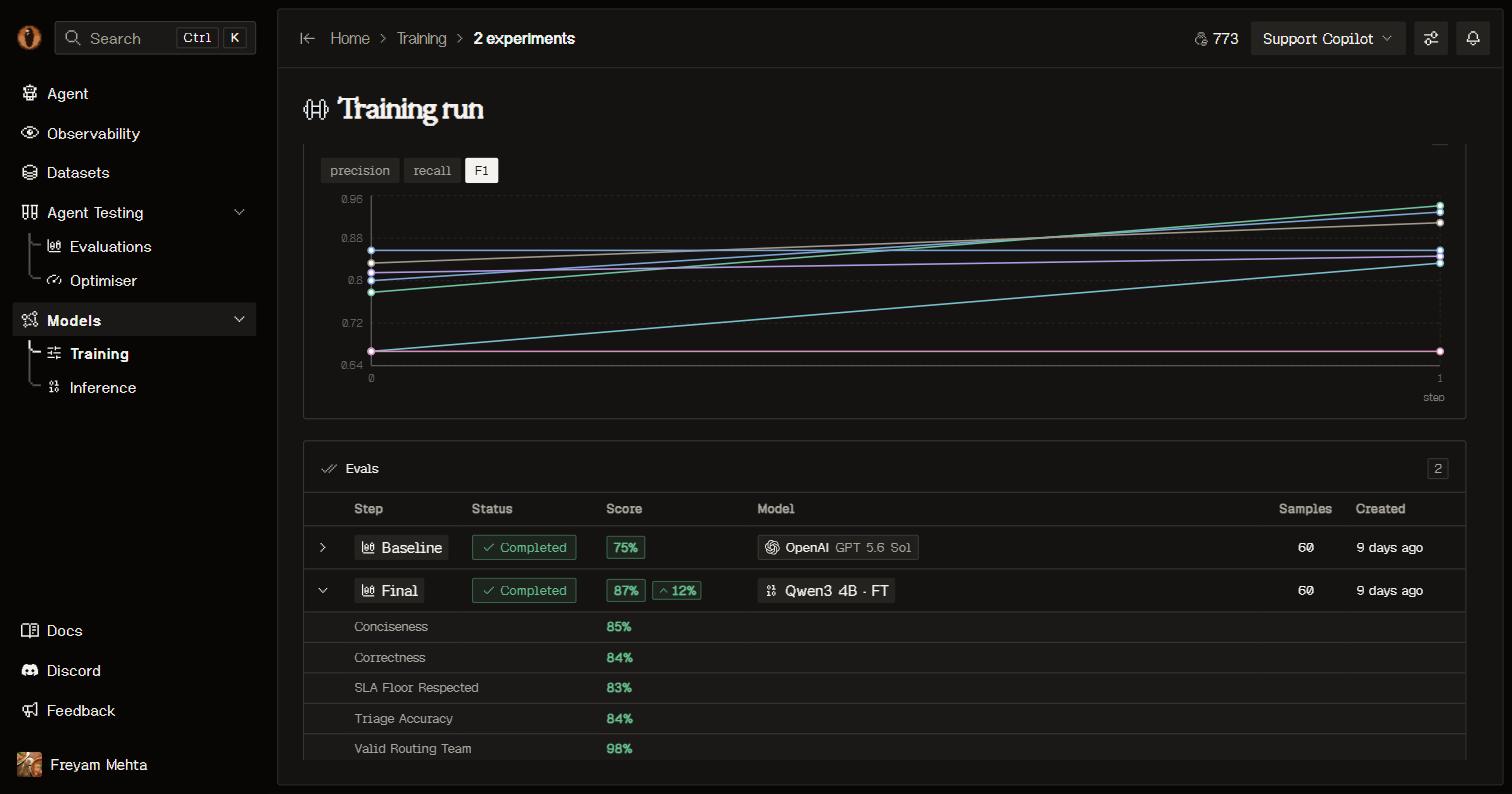
Baseline and Final rows per experiment, scored with the same graders.
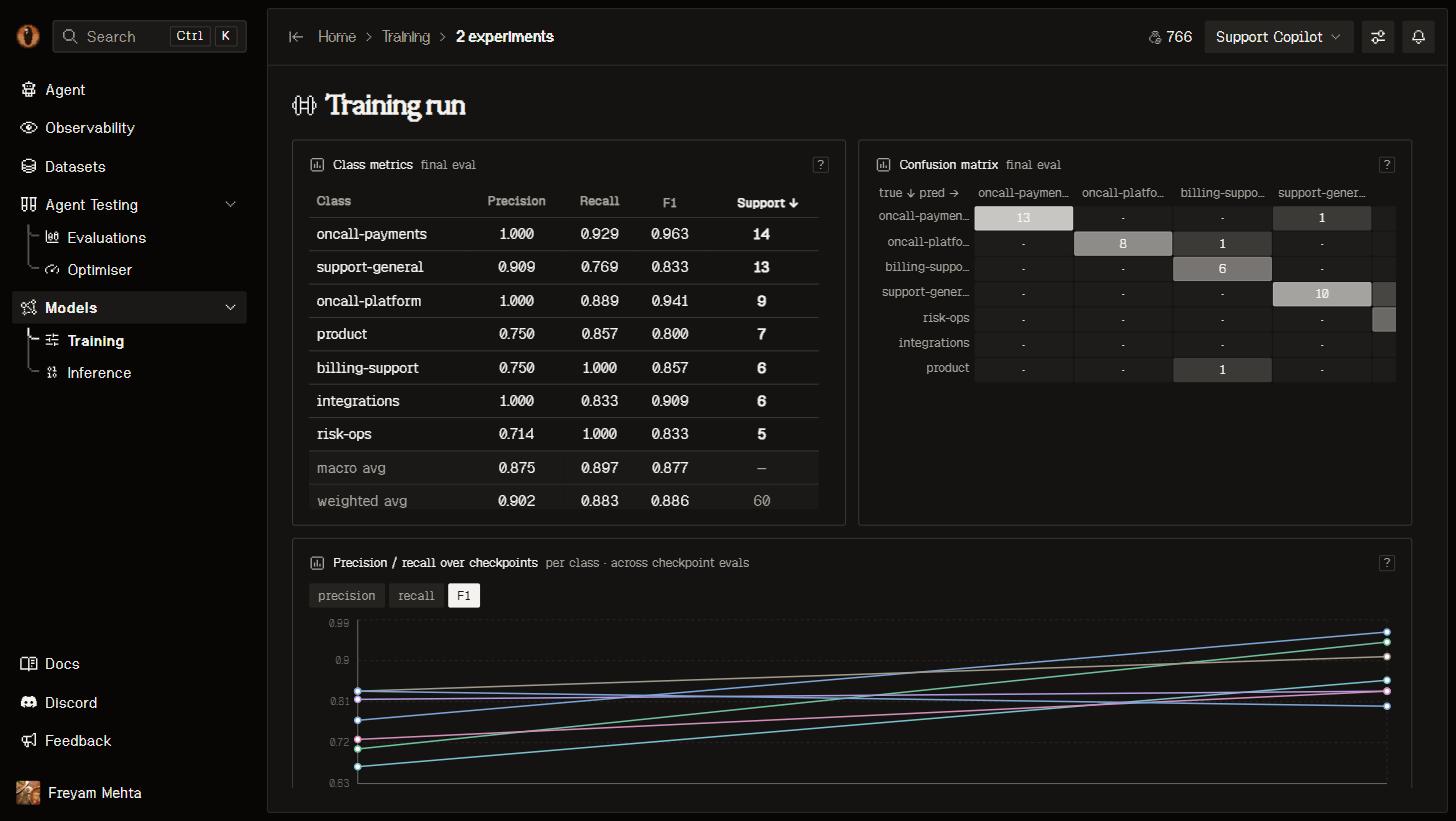
Classification metrics for a routing capability: per-class F1 and the confusion matrix.
Ship it
A finished job deploys its model for you. It appears on Inference and in your capability’s Models tab with a reference likeft-9635f347-qwen3-4b, and its weights are downloadable from the model page or with overmind model download-checkpoint.
Two ways to put it in front of traffic:
- Make live wakes and verifies the model, then switches your capability’s alias
overmind/<capability-uuid>. Inline progress persists across navigation; the previous model continues serving until verification succeeds. - Copy prompt copies instructions for your coding agent to connect your LLM client to the capability alias. The edit lands in your repository through your normal review.
Good to know
- Quality comes from the data, not the hyperparameters. Get the version fitting the train contract first.
- A run freezes the version it trained on, so its numbers stay true while you keep curating for the next one.
- Every experiment reports what it cost when it finishes, and you see the estimate before you launch.
- A model serving real traffic is producing traces again — which is the data for your next round.
Next steps
Call your model
The OpenAI-compatible endpoint, the capability alias, and how serving behaves.
Improve your data
Better rows beat better hyperparameters. Curate and train again.
Compare models first
Backtest several models over your dataset before you train one.
Sharpen your graders
The benchmark is only as honest as the judges behind it.